Every day, tens of thousands of international travelers land at Tan Son Nhat Airport—the busiest air gateway in Southern Vietnam. During peak hours, waiting in long lines at immigration has become a well-known nightmare. To permanently fix this congestion and modernize the airport, the Vietnam Immigration Department made electronic information declarations mandatory starting April 15, 2026.
In this article, Govietnamvisa.com will provide the most complete step-by-step guide, from eligibility criteria and how to fill out the information, to practical tips to help you pass Immigration at Vietnam airport as quickly as possible.
⚠️ New Vietnam Entry Requirement (Effective April 15, 2026)
If you are a foreign passenger or an overseas Vietnamese citizen entering Vietnam with a visa through Tan Son Nhat Airport, you must now follow these steps:
- Declare Online: Fill out your personal information online before you line up for immigration.
- Get Your QR Code: Once submitted, the system will generate a personal verification QR code.
- Show Border Police: Present this QR code to the officer at the immigration counter.
🔴 Important: If you do not complete this online declaration ahead of time, you will be pulled aside for manual processing, which will cause serious delays to your travel plans.
- Legal basis: Official Letter No. 1474/CACK TSN – Vietnam Immigration Department
- Effective date: April 15, 2026
- Scope of application: Tan Son Nhat International Airport (TSN) border gate – Ho Chi Minh City
- Procedure: Online declaration → Receive QR code → Present at border crossing
Many major international airlines such as Vietjet, Korean Air, and Singapore Airlines have proactively sent reminders to passengers right from the online check-in stage or via email confirmation of their bookings. This indicates that this regulation is being implemented consistently and seriously from multiple parties.
Who needs to declare their information before entering Tan Son Nhat Airport?
| Object | Is declaration mandatory? |
|---|---|
| Passengers with foreign nationality | ✅ MANDATORY |
| Overseas Vietnamese use visas to enter Vietnam. | ✅ MANDATORY |
| Vietnamese citizens (Vietnamese passport holders) | ❌ Not applicable |
| Transit passengers do not go through domestic immigration procedures. | ❌ Not applicable |
Instructions for online immigration declaration at Tan Son Nhat Airport.
Below are detailed step-by-step instructions for completing the Pre-arrival Information form on the official website of the Vietnam Immigration Department.
Step 1: Access the system
- Access: https://prearrival.immigration.gov.vn/
- The homepage will display three main buttons. Click the blue button "Create & Submit Pre-arrival Information" (if using Vietnamese, click "Tạo và tập tờ khai").
- Enter the CAPTCHA code (image or letters).
- Select your nationality from the dropdown list.
Note: The website supports Vietnamese and English. It is recommended to fill out the form 1–3 days in advance (maximum before departure).
Step 2: Fill in your personal information (Passenger Information)
This section is located on the very first page of the form (tab 1/4).
- Expected Arrival Date : Select your arrival date in Vietnam (format DD/MM/YYYY, time zone GMT+7).
- Full Name : WRITE IN CAPITAL LETTERS, WITHOUT ACCENTS , exactly as in your passport (e.g., NGUYEN VAN A / CHRISTINE ANNE GEORGE).
- Date of Birth :
- Gender :
- Nationality :
- Country Code + Phone Number : For example, +84 for Vietnam or your country code.
- Email Address : Enter your Gmail or personal email address (to receive confirmation if needed).
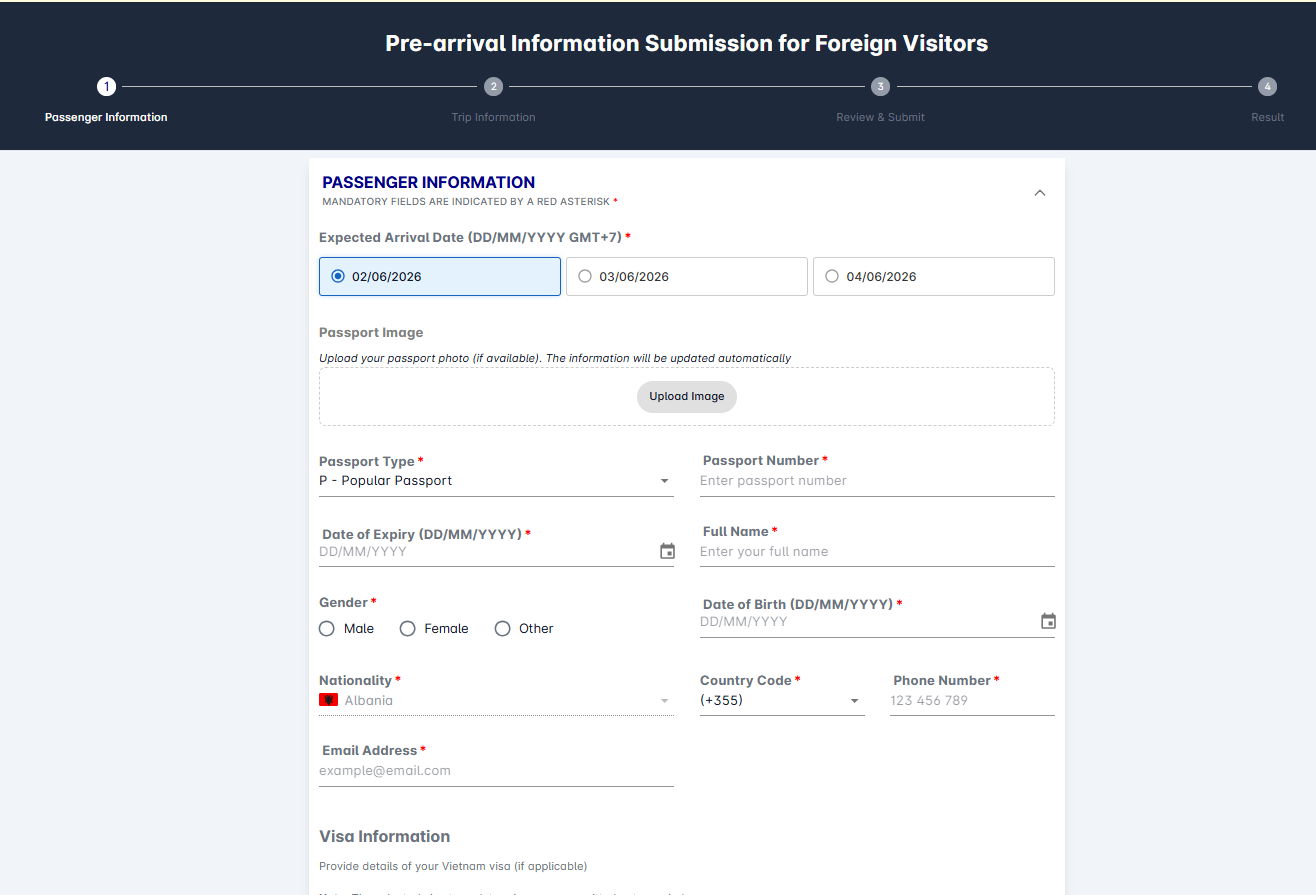
Note: All information must match your passport 100%. Even a single incorrect letter may require you to re-enter the information.
Step 3: Upload your passport image.
Right on the same Passenger Information page:
- Find the Passport Image section .
- Click “Upload Image” .
- Upload a clear photo of your passport bio page – JPG/PNG file, under 2MB.
- The system will automatically read and fill in the data (passport number, issue date, expiry date, full name, etc.).
Note: The image must be clear, not blurry, and have no obscured corners. If the system reads it incorrectly, you will need to correct it manually in a later step.
Step 4: Enter/verify passport information
After uploading, the following fields will appear automatically, or you can fill them in manually:
- Passport Number .
- Date of Expiry : DD/MM/YYYY.
- (The issuance date is usually automatic or optional).
Double-check everything before proceeding.
Note: The image must be clear, not blurry, no light spot and have no obscured corners. If the system reads it incorrectly, you will need to correct it manually in a later step.
Step 5: Fill out the visa/entry purpose form (Visa Information)
Right below the personal information section:
- Select visa type (or purpose): Tourist, Visiting relatives, Business, Working,...
- If you have a visa/e-visa : Fill in the visa number, issue date, and expiry date.
- If visa exemption applies :
- Fill in 0 or N/A for the visa number.
- Issue date = arrival date.
- Expiration date = expected departure date from Vietnam.
- Issuing authority : Write "Visa exemption" or "Visa waiver".
Note: Choosing the wrong visa type may affect the length of your stay.
Step 6: Trip Information
Switch to tab 2 (Trip Information):
- Flight Number : For example, QR970, VN660, VN595, FD640,...
- Arrival Airport : Select Tan Son Nhat (SGN) .
- Accommodation Address (Address in Vietnam): Fill in completely (house number, street, district/county, Ho Chi Minh City or other province). Do not write vaguely like "ABC Hotel".
Note: This is an important section for customs inspection.
Step 7: Review & Submit
Switch to tab 3:
- Check the box "I have read and understood..." (confirming the accuracy of the information).
- Review all the information (there is an "Edit" button if you need to make corrections).
- Click “Submit”
Step 8: Save the profile code (Result)
After successful submission:
- The system displays the Declaration Code .
- Take a screenshot or save this code immediately (for reference, editing, or presentation at the airport if needed).
- You can also print or save it as a PDF.
🌟 General important notes:
- You can fill out the form on behalf of your relatives or friends (each person will have their own form).
- You should declare your departure date 1–3 days in advance, not too close to the flight time.
- The information must match your passport and visa/e-visa 100%. Even minor discrepancies require re-application.
- The pre-arrival declaration form is not related with the temporary residence declaration form – they are two separate procedures.
- If you encounter an error: Use the “Lookup & Update Declaration” button on the homepage to search for and fix it.
=> Upon arrival at Tan Son Nhat Airport, simply present your application code (on your phone) at the customs counter if requested.
Govietnamvisa.com do hope the above information is clear and helpful for you. Will you have a wonderful trip in Vietnam.
You need assistance to clear Immigration procedure and you want to pass Immigration quickly with easy, simple procedure? Apply Fast track Immigration service with Govietnamvisa.com NOW!