The Vietnam E-Visa is the most popular visa option for international travelers. To ensure a smooth application process, it's important to submit a photo that meets all official requirements. Learn how to avoid the most common E-Visa photo mistakes and improve your chances of fast approval with Govietnamvisa.com.
Applying for a Vietnam E-Visa is a simple process. All you need to do is complete the online application form, upload the required documents and photo, pay the visa fee, and wait for approval. However, many travelers are surprised to find their applications delayed—or even rejected—because their uploaded photo does not meet the official requirements. Understanding the common photo mistakes can help you avoid unnecessary setbacks and ensure a smoother application process.
1. Using the Wrong Background
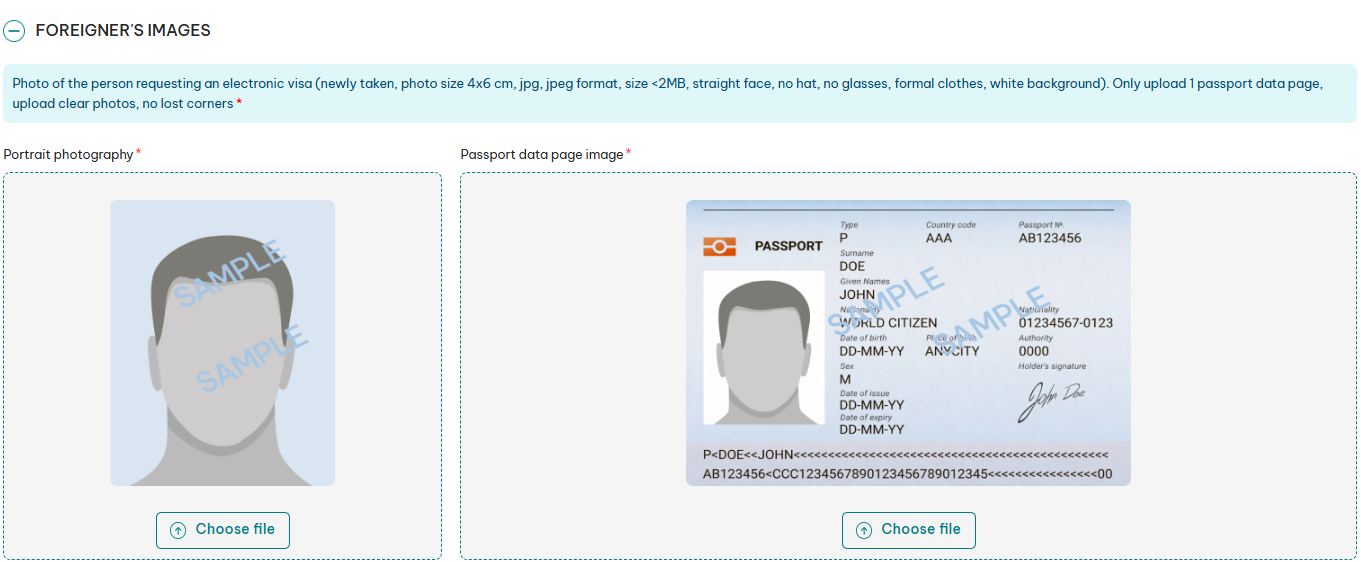
One of the most common mistakes travelers make is uploading a photo with a colored, textured, or cluttered background. Many applicants simply crop a selfie or a casual photo taken at home, in a café, on a sofa, or even at the beach, assuming it will be accepted.
However, Vietnam's E-Visa photo requirements specify that the background must be plain white and free of shadows, objects, or distracting patterns. A non-compliant background may result in processing delays or a request to resubmit your photo.
💡 How to avoid:
- 👉 Use your most recently taken photo for passport or ID.
- 👉 If you do not have one, take the photo against a blank wall or white sheet (but avoid shadow and glare).
- 👉 If that’s not possible, use an online passport photo editor to remove or whiten the background to meet the photo requirements.
2. Incorrect Photo Size and Aspect Ratio
Uploading a photo with the wrong dimensions or aspect ratio is another common mistake. Many travelers use a square-format photo, which is accepted for visa applications in some countries, such as the United States. However, Vietnam's E-Visa has different photo specifications.
For a Vietnam E-Visa application, your photo should be in a portrait orientation with a 4 × 6 cm (approximately 40 × 60 mm) aspect ratio. The file must be in JPG/JPEG format and should not exceed 2 MB in size. If your photo doesn't meet these requirements, your application may be delayed or you may be asked to upload a new one.
💡 How to avoid this mistake:
- 👉 Use a reliable online visa photo tool to crop your image to the correct dimensions and remove the background if needed.
- 👉 Before uploading, verify that the file is in JPG/JPEG format and is smaller than 2 MB.
- 👉 Double-check the photo dimensions on your phone or computer to ensure they match the required portrait format.
3. Poor Lighting and Shadows
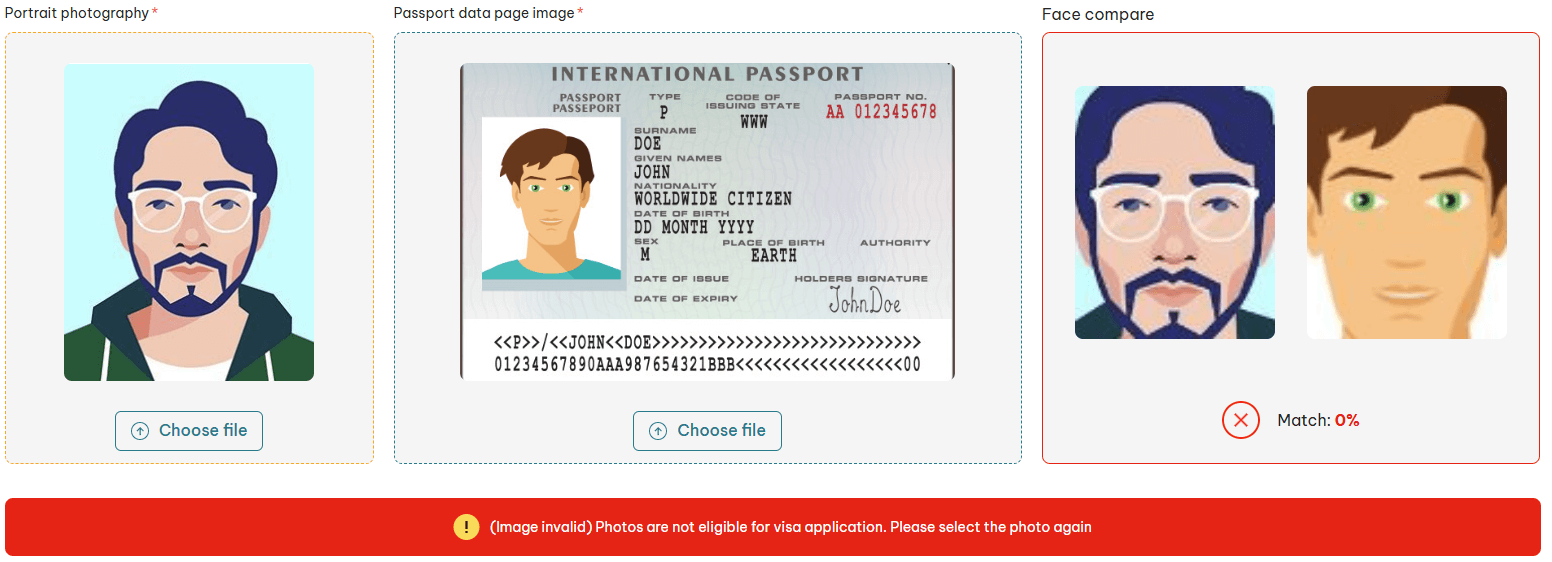
Photos with poor lighting, strong shadows, or glare are common reasons for E-Visa photo issues. If your face is not clearly visible, it may be difficult for immigration officers to verify your identity.
💡 How to avoid:
- 👉 Take your photo in a bright room with natural light.
- 👉 Face the light source and avoid backlighting.
- 👉 Do not use a strong flash that creates glare or shiny spots on your face.
4. Wearing Hats, Glasses, or Accessories
Wearing hats, sunglasses, or other accessories is a common mistake. Even clear glasses can create glare and make your eyes difficult to see.
Your face should be fully visible, with nothing covering your eyes or head.
💡 How to avoid:
- 👉 Remove hats, glasses, and other accessories before taking the photo.
- 👉 Look straight at the camera with a neutral expression and your mouth closed.
5. Using Old or Edited Photos
Using an old photo or one that has been heavily edited can cause problems during the E-Visa application. If your photo doesn't match your current appearance or your passport photo, you may be asked to submit a new one.
💡 How to avoid:
- 👉 Use a recent photo, preferably taken within the last 6 months.
- 👉 Avoid filters, beauty apps, or photo editing that changes your natural appearance.
6. Uploading a Poor Passport Page Scan
In addition to your portrait photo, the Vietnam E-Visa application requires a clear copy of your passport’s bio-data page. Common issues include blurry images, cropped pages, tilted photos, missing ICAO lines, or shadows and glare that make the information difficult to read.
💡 How to avoid:
- 👉 Place your passport flat on a clean, well-lit surface.
- 👉 Take the photo directly from above and make sure the entire page is visible.
- 👉 Check that your name, passport number, and other details are clear and readable.
- 👉 Avoid shadows, reflections, or poor lighting.
7. Using the Wrong File Format
Vietnam E-Visa photos must be uploaded in JPG/JPEG format and should be under 2 MB. If your file is in another format, such as PNG, HEIC, or PDF, you should convert it before uploading.
💡 How to avoid:
- 👉 Convert your image to JPG/JPEG format before submission.
- 👉 Compress the file if it is larger than 2 MB.
⚠️ What Happens If You Submit an Incorrect Photo?
Submitting a photo that does not meet the requirements can delay your Vietnam E-Visa approval. In some cases, you may need to submit new photos or even restart the application process and pay the fee again.
Most photo-related issues can be avoided with a few minutes of careful preparation before submission.
✅ Tips for Taking the Perfect Vietnam E-Visa Photo
Before submitting your application, take a moment to review your photos and make sure they meet all requirements. This simple step can help you save time, avoid extra costs, and prevent unnecessary delays.
Quick checklist:
- ✔️ White background with even lighting.
- ✔️ Photo size: 4×6 cm ratio, JPG/JPEG format, under 2 MB.
- ✔️ Face fully visible, no hats, sunglasses, or accessories.
- ✔️ Neutral expression, eyes open, mouth closed.
- ✔️ Passport page: flat, clear, complete, and free of glare or shadows.
📌 References:
- Official Vietnam E-Visa photo guidelines: https://evisa.gov.vn/instruction
- Vietnam E-Visa issuance procedure: https://dichvucong.bocongan.gov.vn/bocongan/bothutuc/tthc?matt=26277
Need Urgent Vietnam Visa Support? Contact Us 24/7:
- 📞 Hotline: +84.903.278.853 (Zalo, WhatsApp, Viber)
- 📧 Email: support@govietnamvisa.com
- 🌐 Websites: govietnamvisa.com